
Best DJ Controller For Beginners: DJ City Australia’s Top Picks In 2026
How we approached this guide: DJ City sells the products discussed below. Recommendations are based on documented features, current product information, cited specialist reviews and suitability for different beginner needs.
Want to buy your first piece of DJ gear but don’t know where to start? There’s heaps of DJ devices on the market for various levels, but it can be a bit overwhelming for starters. Not to mention some of the price tags aren’t cheap! Look, you don’t need to splurge thousands on an entire club-level CDJ setup to start learning. For most people beginning their DJ journey, a humble two-channel controller, compatible laptop with working speakers (or smartphone), and some wired headphones are all you need to start mixing.
In this guide, we’ve compared six beginner-friendly options at DJ City, while also explaining some of the controls you’ll need to look for when comparing, the accompanying software worth knowing about, and how much room each controller gives you to grow and improve your skills.
TL;DR: The Pioneer DDJ-FLX4 is our top all-round pick for most beginner DJs and the most popular entry point. However, if your budget, software preference or DJing style points in another direction, one of the other five options may be a better fit.
Beginner DJ controllers at a glance
Start with the devices you already own, then narrow your options by software and the style of DJing you want to learn.
| Controller | Best for | Software route | Why it stands out | Main watch-out |
|---|---|---|---|---|

|
Most beginners | rekordbox, Serato DJ Lite, djay and Traktor Play | Familiar two-channel layout, broad learning ecosystem and flexible device support | Compact controls, lightweight build and RCA-only master output |
|
|
Starting on a tighter budget | rekordbox, djay, Serato DJ Lite and Traktor Play | Compact, mobile-friendly and simple to start using | No dedicated library browsing, no microphone input and fewer physical controls |

|
Beginner scratch and open-format DJs | Serato DJ Lite, with an optional paid Pro upgrade | Battle-style layout inspired by a scratch mixer and sideways turntables | Some desirable Serato features require the paid software |

|
Larger jog wheels and roomier physical controls | Serato DJ Lite, with an optional paid Pro upgrade | Six-inch jog wheels, jog displays, long pitch faders and FX paddles | Four-deck software control is not the same as four physical mixer channels |

|
Portable practice and set preparation | Serato DJ Lite and djay Pro | Dedicated browsing and extensive pad controls in a very small footprint | The compact layout may feel cramped as a full-time first controller |
|
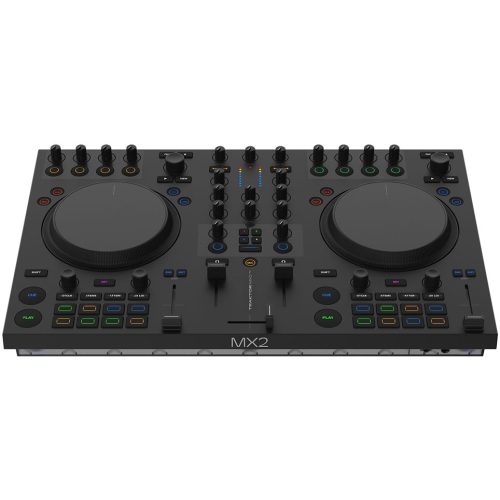
Creative performance with Traktor | Full Traktor Pro 4 licence included | Hands-on stems, Pattern Player and dedicated Deck FX | Traktor-focused, pricier and requires external power |
The best DJ controllers for beginners
1. Best for most beginners: Pioneer DJ DDJ-FLX4
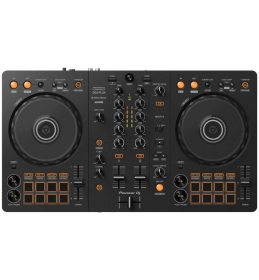
 The DDJ-FLX4 is our strongest all-round pick, combining a familiar two-channel layout, computer and mobile support, broad software compatibility and plenty of beginner help online. MusicRadar also ranks it as its best overall beginner controller.
Why it stands out
- Browsing, gain, EQ and performance controls offer room to learn without an overwhelming layout.
- It works with rekordbox, Serato DJ Lite, djay and Traktor Play, although available features vary between applications.
- Its conventional layout is useful preparation for larger Pioneer DJ or AlphaTheta equipment.
Keep in mind
- The short pitch faders offer less room for fine tempo adjustments.
- The RCA-only master output is less convenient for long cable runs and some PA setups.
- Smart Fader and Smart CFX are useful shortcuts, but they’re no substitute for learning phrasing, EQ and manual transitions.
2. Best budget starting point: AlphaTheta DDJ-FLX2
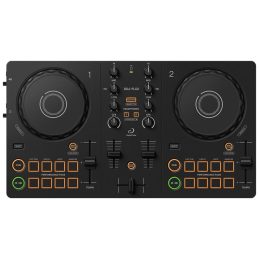
 The DDJ-FLX2 covers the essentials and works with supported phones, tablets and computers across rekordbox, Serato DJ Lite, djay and Traktor Play. A TechRadar hands-on review found it welcoming for first-time DJs, while favouring the FLX4 for buyers with more experience or budget.
Why it stands out
- It’s compact, portable and supports compatible phones, tablets and computers.
- Separate master and headphone outputs let you practise proper headphone cueing.
- It offers a lower-cost way to find out whether DJing is for you.
Keep in mind
- Tracks must be browsed and loaded from your connected device.
- The smaller controls leave less room for fine adjustments.
- There’s no microphone input, and both audio outputs use 3.5 mm connections.
3. Best for beginner scratch DJs: Pioneer DJ DDJ-REV1
 The DDJ-REV1 uses a battle-style layout with spacious jog wheels, horizontal pitch controls and FX paddles, making it the most focused option here for scratching and open-format routines.
Why it stands out
- The battle-style layout gives scratching controls more room.
- Large jog wheels, FX paddles and 16 performance pads support hands-on routines.
- It works out of the box with Serato DJ Lite.
Keep in mind
- The mixer layout is quite different from a conventional club-style controller.
- Recording, additional cues and other features require Serato DJ Pro.
- It’s a more specialised choice than the FLX4.
4. Best for roomier controls: Numark Mixtrack Platinum FX
 The Mixtrack Platinum FX offers six-inch jog wheels, long pitch faders, jog displays and FX paddles. It controls four software decks through two deck sections and mixer channels, so you switch between deck layers.
Why it stands out
- Large jog wheels and long pitch faders make fine tempo and jog adjustments easier.
- The jog displays show useful track information on the jog wheels, so you spend less time looking at the laptop.
- FX paddles make it easy to punch effects in and out during a mix.
Keep in mind
- Its larger footprint takes up more desk space and is less convenient to carry.
- Switching between four software decks adds another layer to learn.
- Serato DJ Lite is included, but advanced Serato features require a paid Pro upgrade.
5. Best compact option: Reloop READY
The Reloop READY packs browsing, gain, effects and 16 performance pads into a controller designed to sit over a 13-inch laptop keyboard. It suits small desks, travel and set preparation.
Why it stands out
- It saves space while retaining dedicated browsing, gain and performance controls.
- It supports Serato DJ Lite on computers and djay Pro on compatible iOS and iPadOS devices.
- Its USB-powered design is well suited to portable setups.
Keep in mind
- The tightly packed layout may feel cramped during longer practice sessions.
- Several modes require Serato DJ Pro, while Key Sync requires the Pitch ’n Time expansion.
- Its two-band EQ is more limited than the three-band layout found on several larger controllers.
6. Best for creative Traktor performance: Native Instruments Traktor MX2
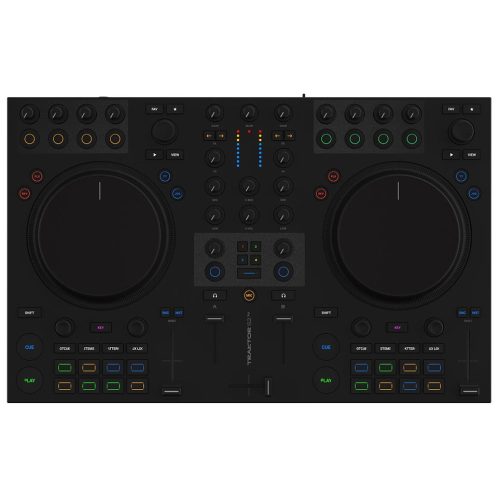 The Traktor MX2 includes Traktor Pro 4 and dedicated controls for stems, Pattern Player, Mixer FX and Deck FX. MusicRadar’s 2026 guide names it the best beginner option for performance DJs.
Why it stands out
- Stems, patterns and effects offer more creative depth than a basic controller.
- The full Traktor Pro 4 licence avoids an immediate software upgrade.
- The larger layout provides more room than the most compact beginner models.
Keep in mind
- It’s built around Traktor and isn’t plug-and-play with rekordbox or Serato.
- It requires a computer and the included external power supply.
- Beginners focused on two-track mixing may not use its deeper features immediately.
Compare all six beginner controllers
Current pricing and stock are loaded directly from DJ City’s catalogue.
-
 Free Shipping$545
Pioneer DJ DDJ-FLX4 2-Channel DJ Controller
-
 Free Shipping$319
AlphaTheta DDJ-FLX2 Compact 2-Channel DJ Controller
-
 Free Shipping$455
Pioneer DJ DDJ-REV1 – Scratch DJ Controller 2 Channel
-
 Free Shipping$439
Numark Mixtrack Platinum FX 4-Deck DJ Controller w/ Built-in Displays
-
 Free Shipping$399
Reloop READY Compact 2 Channel DJ Controller
-
 Free Shipping$699
Native Instruments Traktor MX2 2-Channel DJ Controller
How we chose these beginner DJ controllers
We prioritised beginner workflow, software costs, device compatibility, physical controls, connections, portability, current availability and room to grow. Our research used manufacturer documentation, DJ City listings, product demonstrations, common beginner questions and current specialist coverage from MusicRadar and TechRadar.
What does DJ “deck” actually mean?
The term “deck” originates from OG audio electronics like tape decks, referring to the flat surface or platform housing the playback mechanism. In DJ culture, the word evolved to describe turntables and then digital players, merging with the phrase “on deck”: When record is cued up and ready to play. Nowadays, people informally call all DJ devices “decks” as a catch-all term, since they all let you mix music one way or another. The only difference is the setup, equipment requirements, workflow and cost:
-
- DJ controller: Also known as a DJ board, this device typically needs a laptop or mobile device with DJ software to operate. It’s usually the simplest and most affordable place to start.
- DJ system: An all-in-one device that combines the jogwheel players, mixer and music library browser screen so you can mix without relying on a connected laptop or mobile device. Generally costs more than a controller.
- Media players with mixer: A flexible, modular professional-grade setup, with the DJ player decks separated from the mixer. Similar to what you’ll find in many club DJ booths, with a higher entry cost.
- Turntables with mixer: The original hands-on vinyl or analog route, requiring more equipment, maintenance, space and technical knowledge.
Still choosing? Read our controller vs turntables vs CDJs comparison, or explore all-in-one DJ systems for laptop-free mixing.
What does a beginner DJ controller actually need?
So what’s a player? and what’s a mixer? Don’t worry, all beginner controllers have these functionalities built into one layout, making the fundamentals easy to learn so you’ll know where to look, especially once you’ve levelling up to more advanced DJ systems. Here’s what you need to look for:
Two-channel mixer
Headphone cueing and a built-in audio interface
All controllers have an audio interface built into the mixer section, for controlling the master output and headphone cueing. It lets you prepare, or “cue” the next track in your headphones while the current one plays through your speakers. Check for separate headphone and master outputs that match your headphone jack and speaker cable inputs.
Hands-on EQ, faders, pitch, volume and browsing controls
On the mixer, look for two sets of EQ knobs for controlling the highs, mids and lows of each track. Most standard controllers have three per side, while others only have two. For us, more knobs the better, as it gives you more control and room to develop your EQing skills. Additionally, the channel faders are basically volume controls that bring tracks in and out of the mix. At the very centre, the crossfader allows you to pan between track A on the left, and track B on the right. If you’re planning on playing Hip-hop or scratching, the crossfader is key for cutting techniques. No DJ device is complete without pitch faders. These allow you to speed up or slow down each track so their BPMs match up and your mix isn’t out of sync. Lastly, browsing controls allows you to quickly scroll through your music library to select and load up the track you want to play on each deck. You should get familiar with browsing knobs since these appear on more advanced setups too.
DJ Software
DJ controllers are different from other systems in that they typically require a computer connection with DJ software to operate. Some software allow you to mix music from streaming platforms like Spotify, Apple Music and Soundcloud, while others mainly lean towards managing downloaded files. If you’re planning on mixing from your Spotify library, you can sign in through the DJ software to access your tracks and play them as long as there’s an internet connection. These can be downloaded on their websites so you can test each one’s free plan beforehand to see which UI you prefer before choosing a controller. It’s important to note that not all software is compatible with any one controller, so check the supported software, included licence and reflect on your own use case to see which one suits you. More on this below!
Connections you’ll actually use
USB, master and headphone connections may be enough at home. Microphone inputs, balanced outputs and booth outputs matter more for events and expanded setups.
Which DJ software is best for beginners?
There isn’t one best app for everyone. Choose your controller and software together, because compatibility and included features can make a big difference to the final cost.
rekordbox: A natural route towards AlphaTheta and Pioneer club gear
Rekordbox is worth considering if you want to learn the library workflow used with many AlphaTheta and Pioneer club-grade DJ players.
Serato: A strong fit for scratching and open-format DJing
Serato works with controllers from several brands and is popular for scratch and performance-focused setups. Check whether the controller includes Lite or unlocks Pro.
djay: Worth a look for phone and tablet setups
djay can be a convenient mobile-first option. Check your device, controller, subscription and streaming-service compatibility before buying.
Traktor: Built for effects and creative performance
Traktor suits DJs who want to explore stems, effects and live remixing. Hardware integration and included licences vary between controllers. Practical tip: Download the software, import a few tracks and spend some time exploring it before buying your controller. That can tell you more than another hour of comparing specifications.
What else do you need for a complete beginner DJ setup?
Budget for the equipment and software needed to hear, cue and play music.
- A compatible computer or mobile device: check system and connection requirements.
- Wired DJ headphones: Bluetooth delay makes cueing difficult.
- Speakers or monitors: optional at first if full headphone monitoring is supported.
- The correct audio cable: match the controller output to your speaker input.
- Music and software: account for files, recording restrictions, upgrades and subscriptions.
Our beginner DJ setup guide explains how these parts connect.
What should a beginner avoid overspending on?
It’s easy to get caught up in extra channels and bigger gear, but you don’t need everything on day one. Start with a setup that makes practising easy, then upgrade once you know what your DJ style requires. Good track selection, phrasing, gain control and EQ will take you further than a long feature list.
Frequently asked questions
What is the best DJ controller for a complete beginner?
The DDJ-FLX4 is our strongest general-purpose starting point. Choose the FLX2 for a lower-cost entry, REV1 for scratching, Mixtrack Platinum FX for roomier controls, READY for portability or Traktor MX2 for creative performance.
Do beginners need a two-channel or four-channel controller?
Two channels are enough to learn the essentials. Choose four channels when you’ve mastered two-channel mixing and have a clear plan to layer more tracks.
Can I DJ without a laptop?
Yes. Some controllers work with phones or tablets, while standalone systems operate without a computer. Mobile-compatible controllers usually cost less; standalone systems offer a more self-contained workflow.
Is rekordbox or Serato better for beginners?
Neither is universally better. rekordbox suits people interested in AlphaTheta’s wider ecosystem, while Serato supports several brands and is common in scratch and open-format workflows.
Can I learn to DJ with the DDJ-FLX2?
Yes. It provides two decks, EQ, faders, jog wheels, pads and separate master and headphone outputs. Without dedicated browsing, you will use your connected device more often than with an FLX4.
Will I outgrow an entry-level controller quickly?
Not necessarily. A two-channel controller can support years of practice. Upgrade when you need something specific, such as balanced outputs, standalone playback, four channels or external inputs.
Sources and further reading
Related DJ City guides
- How to DJ: The Beginner’s DJ Setup Guide
- DJ Controller vs Turntables vs CDJs
- Top All-in-One DJ Systems
- Pioneer DJ DDJ-REV1 vs DDJ-FLX4
Manufacturer and independent research
- AlphaTheta: DDJ-FLX2 features and specifications
- AlphaTheta support: DDJ-FLX4 manuals, software and support information
- Native Instruments: Traktor Play setup for the DDJ-FLX2 and DDJ-FLX4
- Pioneer DJ: DDJ-REV1 features and specifications
- Numark: Mixtrack Platinum FX features and specifications
- Reloop: Reloop READY features and specifications
- Native Instruments: Traktor MX2 specifications
- MusicRadar: Best beginner DJ controllers
- TechRadar: Hands-on DDJ-FLX2 assessment
- Serato: Reloop READY software features and upgrade information
Ready to choose your first DJ controller?
Start with how you want to learn, the device you own and your preferred software. Still stuck between two controllers? Tell the DJ City team what music you play, which device you already own and where you’d like to DJ. We can help you narrow it down without paying for features you don’t need.
Follow our socials for the latest updates: